Nero Motion Tracker Segment Tracking – FAQ & Troubleshooting
1. What are the recommended system specifications for Segment Tracking?
For the best compatibility and performance, we strongly recommend using NVIDIA graphics cards with at least 6GB VRAM. While other cards may work, NVIDIA GPUs provide the most stable experience for AI-based motion tracking.
2. I am using an AMD graphics card and the tracking fails or crashes. What should I do?
When running on AMD graphics cards, the application uses Direct ML for hardware acceleration. However, because Microsoft has not updated Direct ML components recently, this often leads to compatibility gaps with current AMD graphics card drivers. This can result in tracking failures or AMD driver application crashes.
Solutions:
- Try restarting the application and running the tracking again.
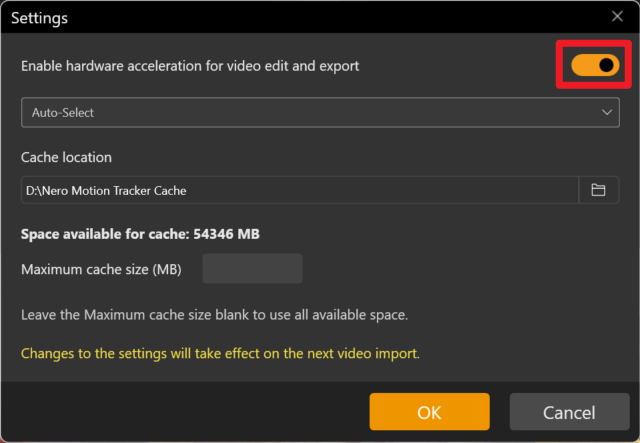
- If the issue persists, switch to the Software Tracking method within the settings to bypass hardware acceleration issues.
Turn off hardware acceleration.
3. Can I use Intel Graphics for Segment Tracking?
You may encounter performance issues when running Segment Tracking on Intel platforms. If you wish to use an Intel graphics card:
- Update Drivers: Please ensure your GPU driver is updated to the absolute latest version.
- Potential Issues: Without the latest drivers, you may experience symptoms such as the inability to detect the tracking object or extremely slow tracking speeds.
Visited 42 times, 1 visit(s) today