Audio normalization is a feature that balances the playback volume of different music tracks so they sound more consistent.
Audio normalization can be used in two different scenarios, depending on how you listen to or export your music.
1. Music Normalization During Music List Playback
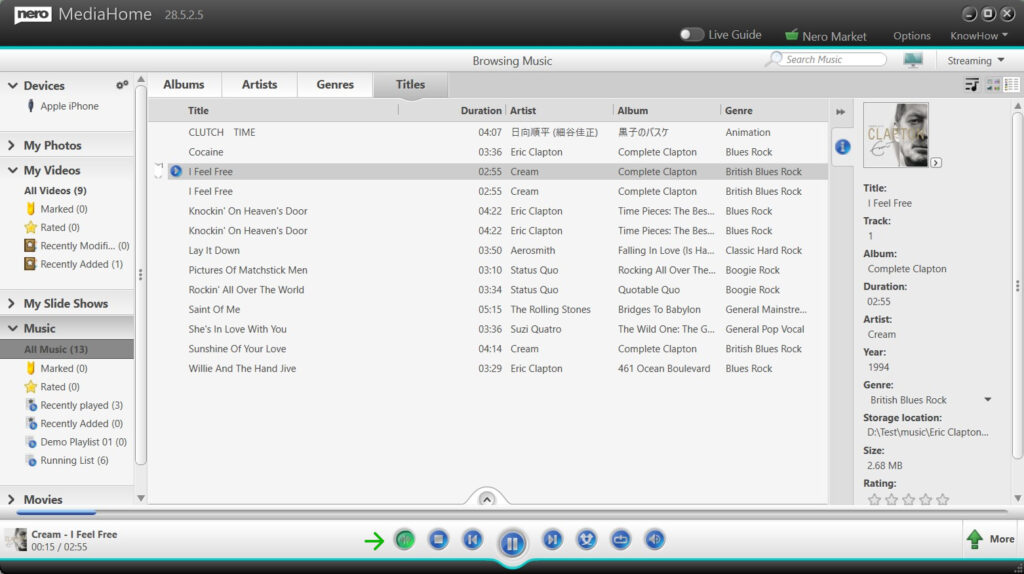
If you listen to music directly in Nero MediaHome:
-
Open your music list.
-
Locate the Audio Normalization on/off button in the playback controls.
-
Turn Audio Normalization ON.
Once enabled, music normalization will be applied automatically during music list playback, helping to keep volume levels balanced between tracks.
You can turn this option off at any time.
2. Music Normalization When Exporting Music to External Devices
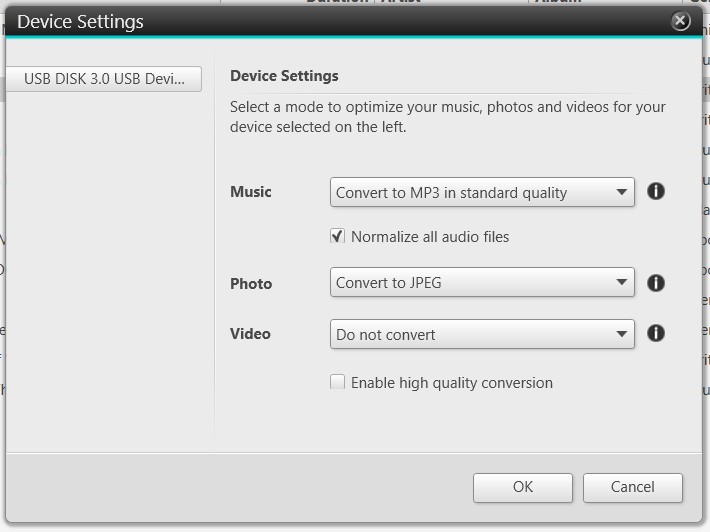
If you copy or export music from your Nero MediaHome library to an external device (for example, a USB stick or SD card for use in your car):
-
Connect the external device to your computer.
-
Open Device Settings in Nero MediaHome.
-
Enable the option Normalize all audio files.
-
(Optional) Select your preferred output music format, such as MP3.
-
OK to start the process.
During export, Nero MediaHome will balance the volume of all music files as they are written to the external device, ensuring a more consistent listening experience on other players.
Additional Notes
-
Music normalization is optional and user-controlled.
-
Original music files in your library remain unchanged.
-
The feature is especially useful for mixed playlists, older music collections, and in-car listening.