What is Nero Quick Actions?
Nero Quick Actions helps you start common media tasks without first figuring out which Nero application to use.
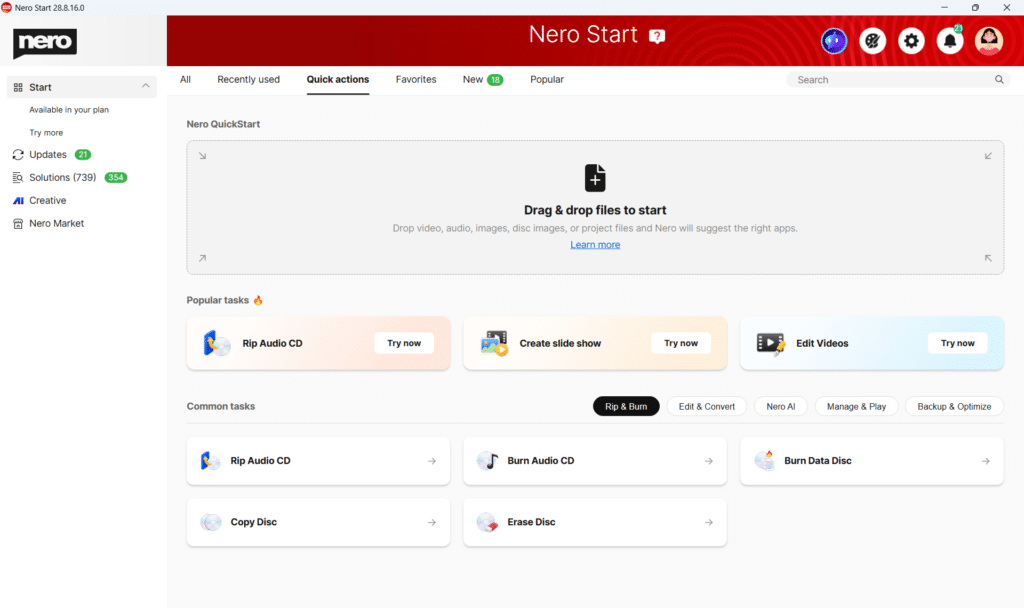
Go to Nero Start > Quick Actions and either:
- Drag and drop your files — Nero analyzes the file type and suggests suitable apps and actions.
- Choose a task — select what you want to do, such as rip an audio CD, burn a disc, create a slideshow, or edit a video.
QuickStart then guides you to the right Nero application for the job.
Why use Quick Actions?
If you have several Nero applications installed, you may know what you want to do, but not necessarily which app you need.
Quick Actions makes this easier:
- Start with your task, not the app — tell Nero what you want to do and let it find the right tool.
- Save time — launch common tasks directly from Nero Start.
- Discover what Nero can do — browse tasks by category and find useful features you may not have used before.
- Get the right app — if a required Nero app is not installed yet, Nero Start can guide you to install it.
Start with your files
Already have the files you want to work with?
- Open Nero Start > Quick actions.
- Drag your video, audio, image, disc image, or supported project file into the Drag & drop files to start area.
- Nero QuickStart checks your files and shows suitable actions.
- Choose what you want to do.
- Nero Start opens the appropriate Nero application so you can continue.
For example, drop a video file to quickly find options for editing, converting, playing, or enhancing it.
Start with a task in Quick Actions
You don’t need to add files first.
Under Popular tasks and Common tasks, simply select what you want to do.
You can browse categories such as:
Rip & Burn · Edit & Convert · Nero AI · Manage & Play · Backup & Optimize
Select a task such as Rip Audio CD, Burn Data Disc, Create slide show, or Edit Videos, and Nero Start will take you to the appropriate Nero application.
What if the required Nero app is not installed?
QuickStart can also recognize when the Nero application needed for a task is not currently installed.
In this case, Nero Start will guide you to install the required app before you continue.
If the required application is not included in your current Nero product, Nero Start may show you an available upgrade option.
Quick tip
You don’t need to remember which Nero application handles each file type or task.
Just start with your files or what you want to do — QuickStart helps you find the right way forward.