What’s new in this Nero Start update?
This update introduces a new Uninstall & Cleanup center inside My Nero Account. It helps you remove Nero apps faster — especially when you want to uninstall multiple apps or clean up older versions.
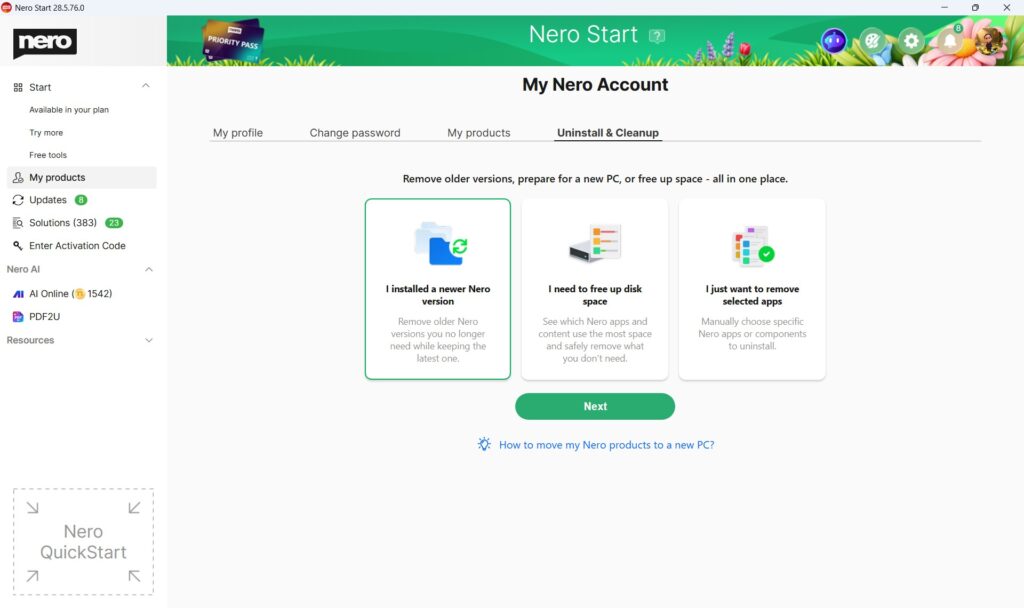
Where can I find “Uninstall & Cleanup”?
Open Nero Start → go to My products → select the new Uninstall & Cleanup tab.
What can Uninstall & Cleanup do?
With Uninstall & Cleanup you can:
- Uninstall multiple Nero apps at once (batch uninstall)
- Remove older versions in one go to keep your PC cleaner
- Free up disk space faster by sorting apps by size and removing the ones you don’t need
Will uninstalling remove my personal files?
Uninstalling a Nero app removes the application from Windows. Your personal files (for example videos, photos, music, and documents) are not deleted.
If an app includes optional settings or cache data, those may be removed as part of the uninstall process.
What else is included in this update?
We also included usability improvements and bug fixes to make Nero Start more reliable.
How do I uninstall apps in batch?
See our How-to article: How to uninstall Nero apps in batch .
Visited 90 times, 1 visit(s) today