What’s new in this version?
- New: Switch between Local (in-app) login and Online login anytime in Options
- Improvements: Stability and usability updates, including smoother activation code entry
What is “Open browser to sign in” vs “Sign in within Nero Start”?
Nero Start now lets you choose how the sign-in screen opens:
- Open browser to sign in: Sign in using your default web browser.
- Sign in within Nero Start: Sign in directly inside Nero Start.
What’s the benefit of open browser to sign in?
When you sign in using Open browser to sign in, your sign-in status can be shared across Nero services that require account login – so you may not need to sign in again in other Nero experiences on the same device/browser environment, for example:
- Nero Microsoft Store applications,
- Nero’s official website,
- Nero AI online services.
This cross-service sign-in experience is not available with Sign in within Nero Start.
How do I switch between different sign-in method?
You can switch anytime in Options, which is helpful if your preferred method works better on your system.
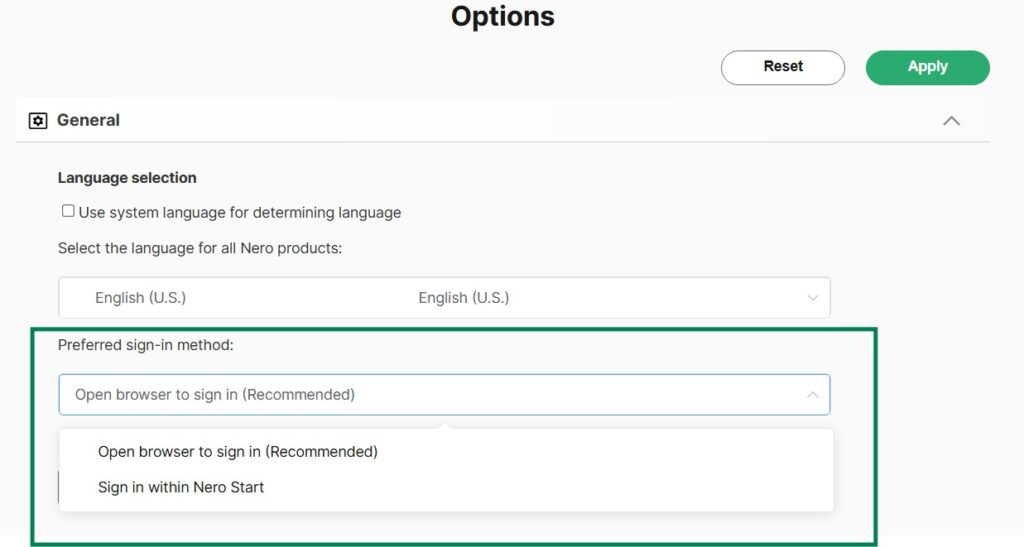
- Open Nero Start.
- Go to Options.
- Find Preferred sign-in method (or a similarly named setting).
- Select one option:
- Open browser to sign in, or
- Sign in within Nero Start
- Apply.
Visited 126 times, 1 visit(s) today