Applies to:
Users who activate a Nero subscription while the same product is already active in their Nero Account.
Why am I seeing this dialog?
You’re activating a product that is already available in your Nero Account.
Instead of automatically extending your existing subscription, Nero Start now lets you choose how you would like to use your new activation code.
You have two options:
- Extend an existing subscription
- Use on another device
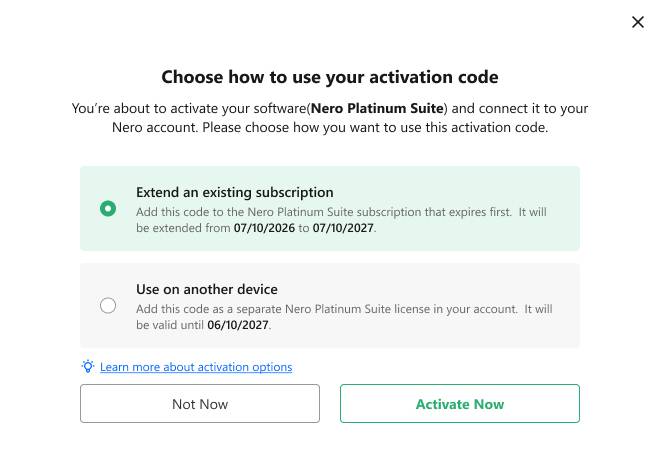
Option 1: Extend an existing subscription
Choose this option if you want to extend your current subscription.
Your activation code will be added to one of your existing subscriptions, and the expiration date will be extended.
For example:
Current subscription:
Expires: July 10, 2026
After activation:
Expires: July 10, 2027
If your account contains multiple subscriptions for the same product, Nero Start selects the subscription that expires first by default. You can also select a different subscription by choosing Change subscription.
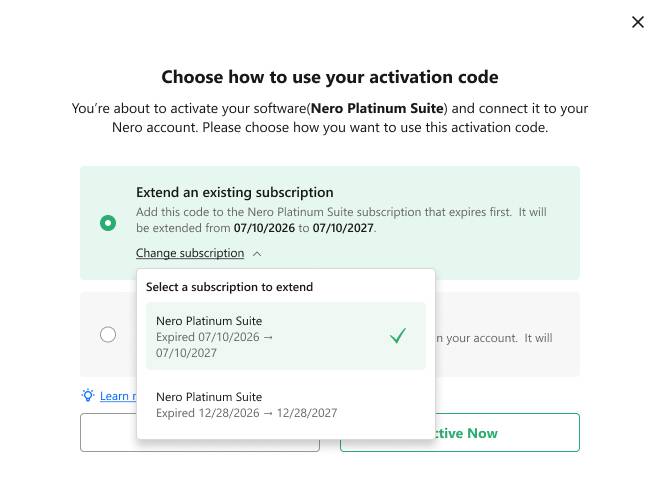
Best for:
- You want to continue using the same subscription.
- You don’t need another product license.
- You want to extend your subscription period.
Option 2: Use on another device
Choose this option if you want to create a separate product license.
Your activation code will become a new subscription in your Nero Account instead of extending an existing one.
Since most Nero products are licensed for 1 PC per license, this option is useful if you want to use the product on another PC.
For example:
Your account currently contains:
- Nero Platinum Suite (expires July 10, 2026)
After choosing Use on another device:
- Nero Platinum Suite (expires July 10, 2026)
- Nero Platinum Suite (expires July 10, 2027)
Each subscription can be used on its own licensed PC.
Best for:
- You want to use Nero on another PC.
- Another family member or colleague will use a separate license.
- You don’t want to extend your current subscription.
Which option should I choose?
| If you want to… | Choose… |
|---|---|
| Continue using the same license for a longer time | Extend an existing subscription |
| Create another license for a different PC | Use on another device |
Can I change my choice later?
No.
Once the activation code has been used, the selected option cannot be changed.
Please review your choice carefully before selecting Activate Now.