Wenn Sie Ihr Nero-Produkt bereits auf einem PC installiert und aktiviert haben, es aber nun auf einem anderen Computer verwenden möchten, gehen Sie bitte wie folgt vor:
Für Nero 2019 oder frühere Versionen:
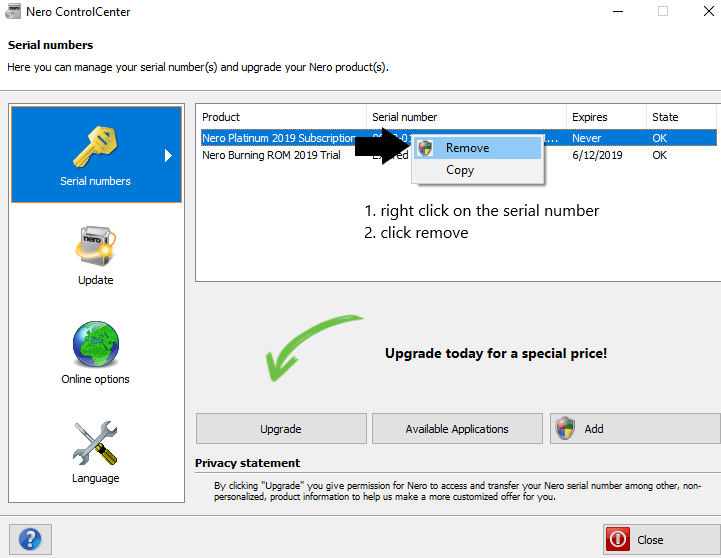
1. Entfernen Sie die Seriennummer aus dem Nero Control Center auf dem alten Computer (siehe Screenshot). Bitte beachten Sie, dass Sie dann Nero auf dem alten Computer nicht mehr nutzen können.
Remove Serial Number
2. Deinstallieren Sie die Nero-Software auf dem alten PC.
3. Installieren Sie die Nero-Software auf dem neuen PC mit der gleichen Seriennummer.
Für Nero Platinum-Abonnement, Nero 2020 und höher:
1. Melden Sie Ihr Nero-Konto in Nero Start ab, falls Sie sich angemeldet haben.
2. Deinstallieren Sie die Nero Software auf dem alten PC.
3. Installieren Sie die Nero Software auf dem neuen PC. Starten Sie Nero Start, melden Sie sich mit Ihrem Nero-Konto an, um die Software freizuschalten.
Den Download-Link des Nero-Installationsprogramms finden Sie in diesem Artikel.
Dieser Artikel ist eine Anleitung für die erste Verwendung eines Aktivierungscodes. Wenn Sie Ihren Aktivierungscode schon einmal aktiviert haben und nun die Nero Software neu installieren, lesen Sie bitte diesen Artikel.
Wenn Sie die Nero Platinum Suite nicht direkt bei Nero.com, sondern z. B. über Amazon, Software Store etc. kaufen, erhalten Sie den 32-Bit-Aktivierungscode im gekauften Softwarepaket.
Nach der Installation müssen Sie zunächst Ihr Nero-Konto direkt in Nero Start registrieren.
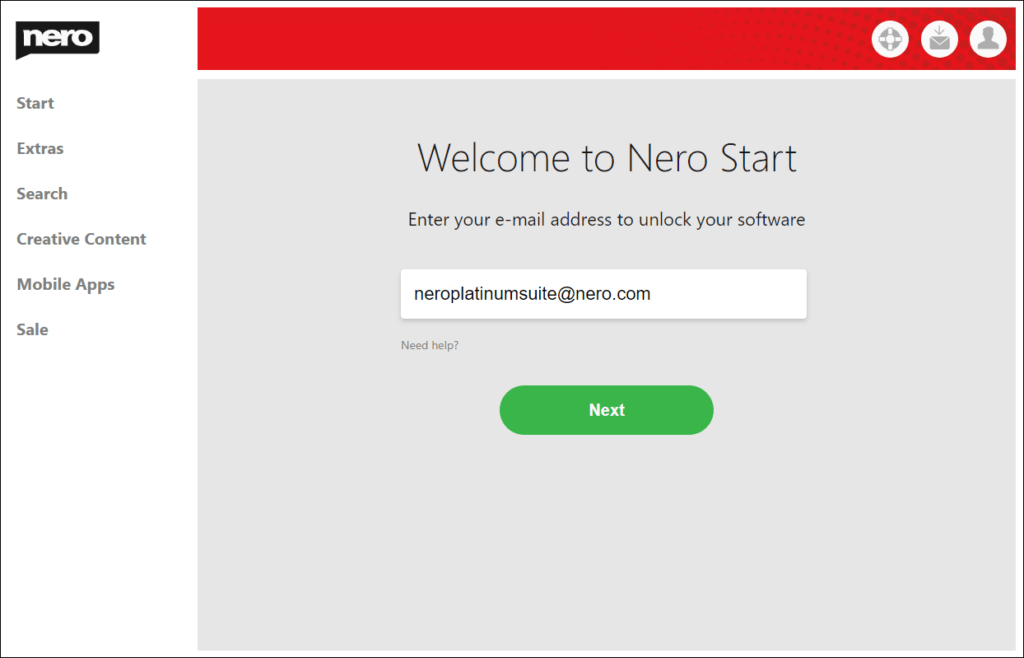
Starten Sie Nero Start, geben Sie im ersten Bildschirm eine beliebige E-Mail-Adresse ein und Nero Start prüft, ob bereits ein Nero Konto mit dieser E-Mail-Adresse registriert ist. Wenn kein solches Nero-Konto existiert, hilft Ihnen Nero Start bei der Registrierung eines neuen Nero-Kontos.
Enter email
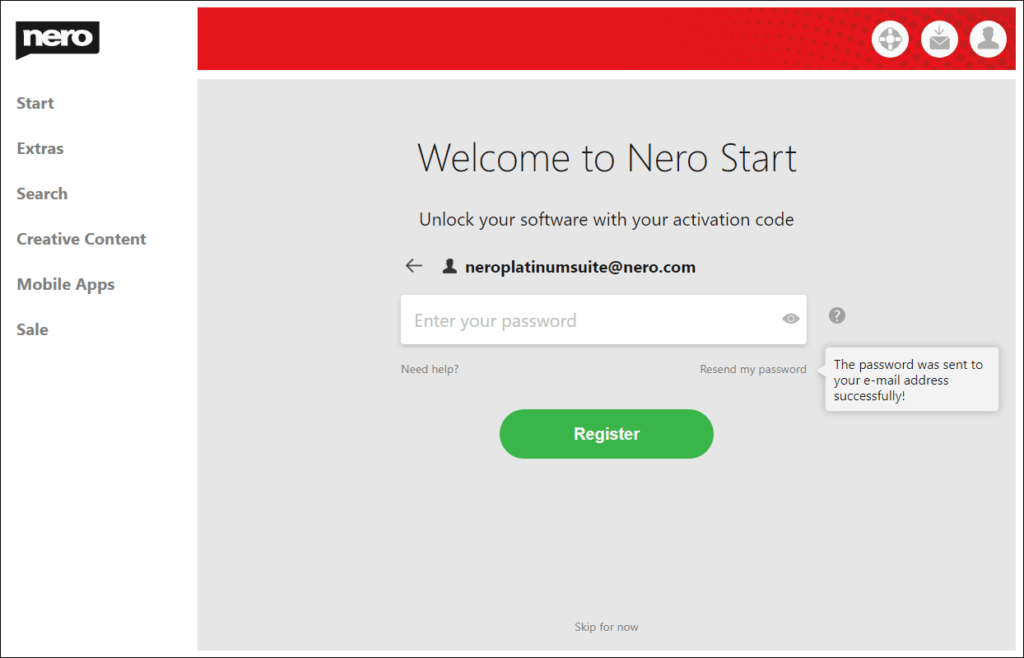
Während der Registrierung wird Ihr Passwort für das neue Nero-Konto an die von Ihnen angegebene E-Mail-Adresse gesendet. Geben Sie das Passwort in Nero Start ein, um die Registrierung Ihres Nero-Kontos abzuschließen.
Enter password
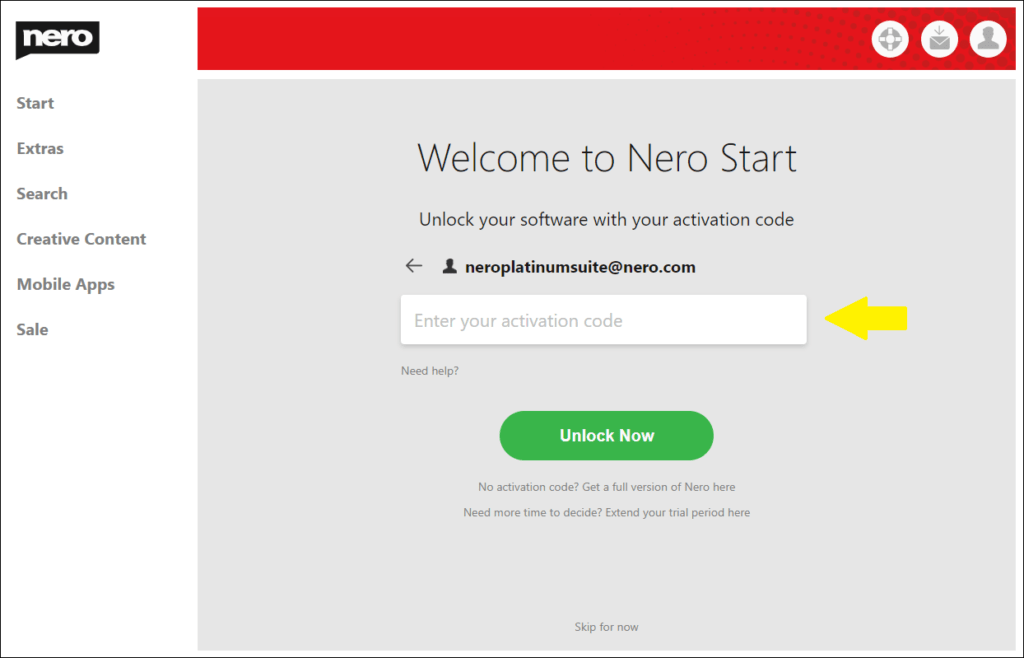
Nachdem Sie zum ersten Mal ein Nero-Konto in Nero Start registriert haben, werden Sie auf eine Seite weitergeleitet, auf der Sie Ihren 32-Bit-Aktivierungscode eingeben können, um Ihre Software freizuschalten. Bitte geben Sie den Aktivierungscode ein, der in dem von Ihnen gekauften Softwarepaket aufgedruckt ist.
Enter activation code
Lösen Sie den Aktivierungscode in Ihren Kontoeinstellungen ein.
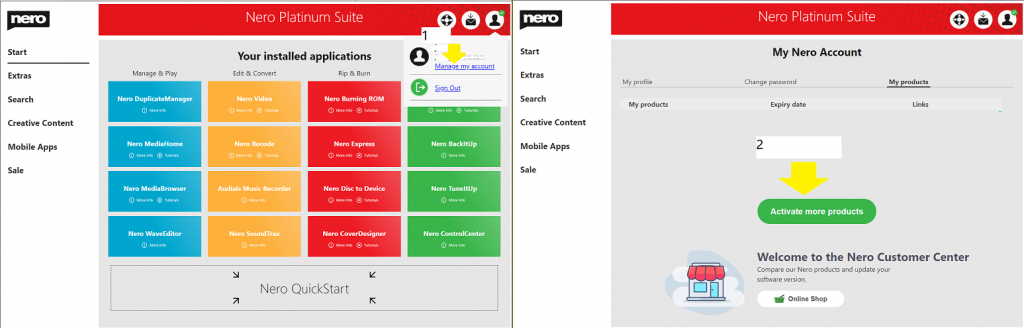
Sobald Sie sich bei Nero Start angemeldet haben, können Sie unter „Kontoeinstellungen“ -> „Meine Produkte“ weitere Produkte mit deren Aktivierungscodes hinzufügen.
active more products
Konto-Einstellungen
Sie können die Registrierung beim ersten Start von Nero Start auch überspringen und später in den Kontoeinstellungen vornehmen.
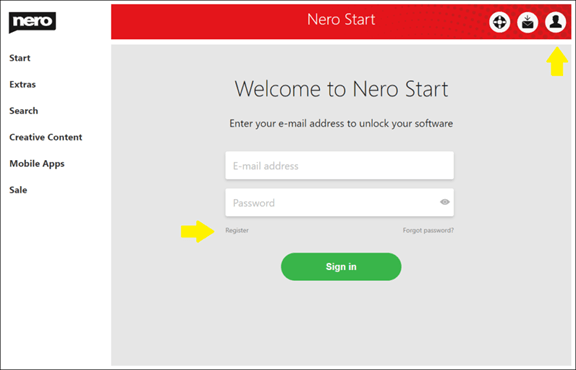
Klicken Sie dazu auf die Schaltfläche „Kontoeinstellungen“ in der oberen rechten Ecke von Nero Start und klicken Sie auf „Registrieren“, um ein Nero-Konto zu erstellen.
register account
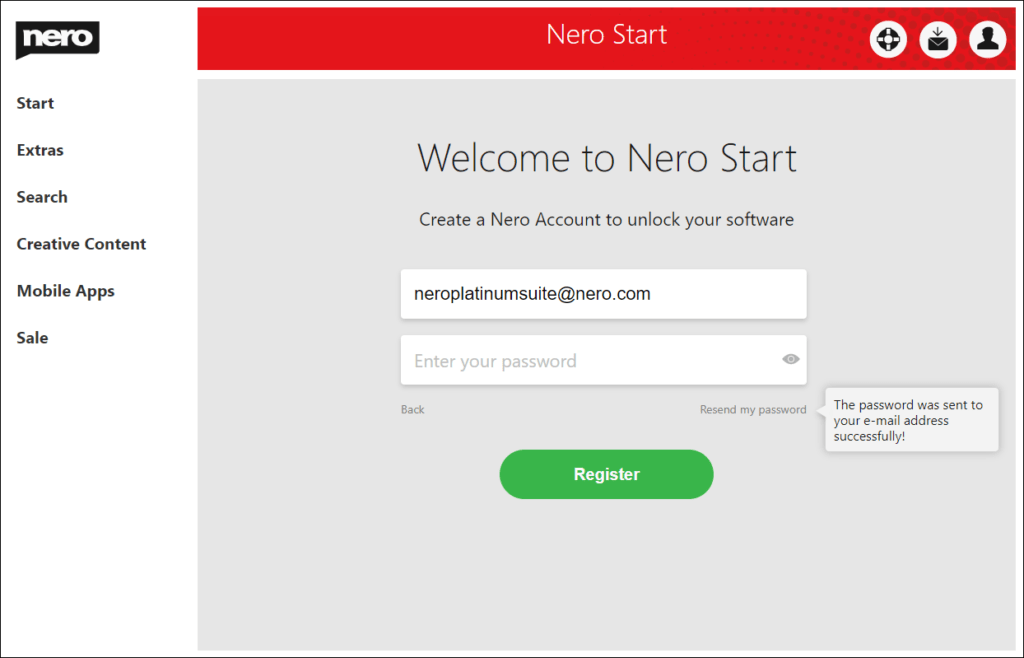
Geben Sie im Fenster zur Registrierung Ihres Nero-Kontos Ihre E-Mail-Adresse ein, klicken Sie auf den Link „Mein Passwort erneut senden“ und Ihr Passwort wird an die angegebene E-Mail-Adresse gesendet. Geben Sie Ihr Passwort ein und klicken Sie auf die Schaltfläche „Registrieren“, um die Erstellung Ihres neuen Nero-Kontos abzuschließen.
resend password
Info: Wenn Sie die E-Mail mit Ihrem Passwort nicht erhalten haben, überprüfen Sie bitte auch Ihren Spam-Ordner.
Wenn Sie bereits ein Nero-Konto haben, melden Sie sich damit an oder setzen Sie Ihr Passwort zurück. Gehen Sie zurück zum Anmeldebildschirm, um sich anzumelden.
Nachdem Sie Nero Platinum oder eine andere Nero Software von Nero.com gekauft haben, erhalten Sie eine E-Mail mit Bestellinformationen:
Software Download Link
Ihr 8-Bit Initialpasswort für Ihren Nero Account.
So melden Sie sich an:
Laden Sie das Installationsprogramm auf Ihren lokalen PC herunter.
Öffnen Sie den Ordner, in den Sie den Installer heruntergeladen haben.
Doppelklicken Sie auf die heruntergeladene exe-Datei, um sie zu installieren. Sollten bei der Installation Probleme auftreten, finden Sie hier weitere Informationen.
Nach der Installation starten Sie Nero Start.
Melden Sie sich mit Ihrer E-Mail-Adresse an.
Es muss dieselbe E-Mail-Adresse sein, die Sie bei der Bestellung angegeben haben.
Geben Sie Ihr Passwort ein. Es ist der 8-Bit-Code, den Sie in der Produktinformations-E-Mail erhalten haben.
Nach der Freischaltung von NeroPlatinum:
Nach erfolgreicher Anmeldung wird Ihr Nero-Produkt automatisch freigeschaltet. Siehe hier.
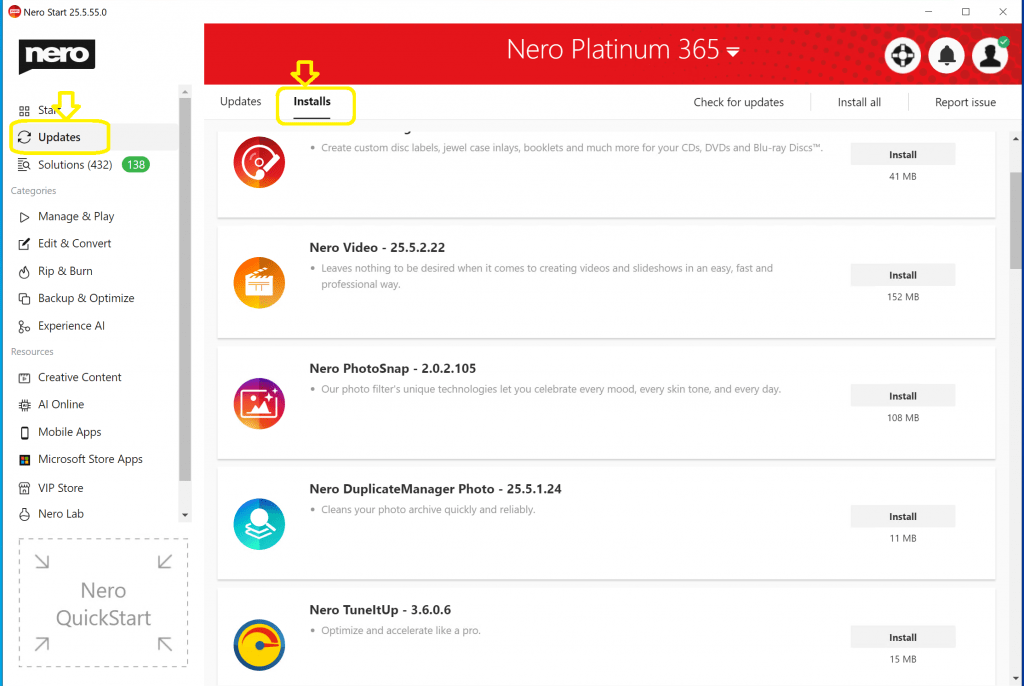
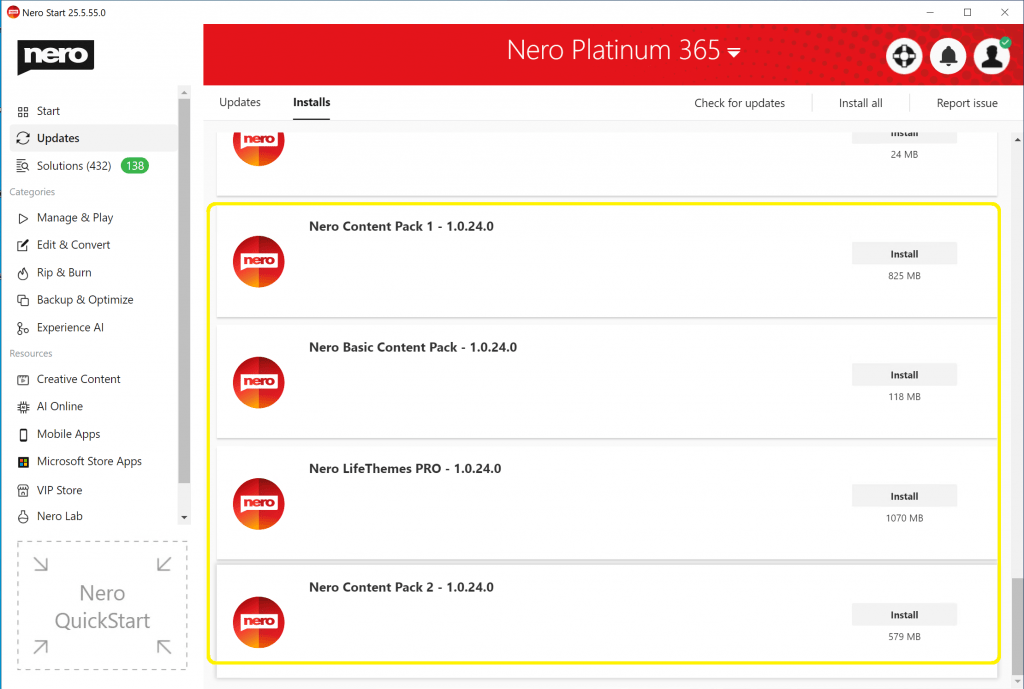
Sie können Nero-Anwendungen über Nero Start -> Updates -> Registerkarte Installationen installieren.
Die Inhaltspakete können in beliebiger Reihenfolge installiert werden. Sehen Sie sich den Screenshot unten an, um zu erfahren, wie man sie installiert. Wenn Sie Probleme beim Herunterladen des Installationsprogramms haben, finden Sie die Download-Links für die Offline-Installer in diesem Artikel.
Nero Muse ist eine AIGC-App, mit der Sie KI-Kunst auf der Grundlage von Eingabeaufforderungen und Fotos erstellen können. AIGC steht für AI Generate Contents. Es ist ein auf künstlicher Intelligenz basierendes Tool, das bei der Erstellung von Fotos und Bildern hilft.
Wie funktioniert Nero Muse?
Nero Muse verwendet maschinelle Lernalgorithmen, um den Kontext, den Ton und den Stil des Inhalts zu analysieren und zu verstehen. Anschließend generiert es einzigartige und hochwertige Fotos auf der Grundlage der von den Nutzern bereitgestellten Eingaben wie Aufforderungen und Referenzbilder.
What are the benefits of using Nero Muse?
Using Nero Muse can save time and effort in image creation. It can generate images quickly and efficiently. What’s more, it is a lot of fun to share your AI artworks and creations. You can also get inspired by the Artwork Gallery which is published by other creators.
Was sind die Vorteile der Verwendung von Nero Muse?
Nero Muse ist benutzerfreundlich und einfach zu bedienen.
Der Rookie-Modus ist für Benutzer gedacht, die mit der KI-Bilderstellung überhaupt nicht vertraut sind. Die Benutzer müssen nur ein Foto aus der Bibliothek auswählen und einen Stil wählen. Dann verwandelt die App das echte Foto in großartige KI-Kunst.
Der „Hall of Fame“-Modus ist für Neulinge, die noch nie etwas von KI-Bilderzeugung gehört haben, etwas schwierig. Wie bei den anderen KI-Bildgeneratoren müssen die Benutzer eine Eingabeaufforderung schreiben, bevor die KI mit der Verarbeitung beginnt.
Was ist Prompt und wie funktioniert es?
Bei der Bilderzeugung ist ein Prompt eine kurze Beschreibung oder ein Satz, der dem KI-Modell eine Idee oder ein Konzept liefert, aus dem es ein Bild erzeugen soll. Das Modell verwendet dann Algorithmen, um ein Bild zu erstellen, das dem Prompt entspricht. Die Qualität des erzeugten Bildes hängt von der Qualität des Modells und der Detailgenauigkeit des Prompts ab.
Wie schreibt man eine Eingabeaufforderung für die Bilderzeugung?
Um eine gute Aufforderung zur Bilderstellung zu schreiben, sollten Sie so spezifisch und detailliert wie möglich sein. Verwenden Sie eine beschreibende Sprache, um den Stil, den Ton und den Kontext zu vermitteln, den das Bild haben soll. Es ist auch hilfreich, Referenzbilder oder Beispiele anzugeben, damit das KI-Modell besser versteht, wonach Sie suchen. Experimentieren Sie mit verschiedenen Eingabeaufforderungen und finden Sie heraus, was für Sie am besten funktioniert.
Ist die Nutzung kostenlos?
Ja, Nero Muse bietet eine kostenlose Version mit eingeschränkten Funktionen. Mit der kostenlosen Version können Benutzer Bilder mit einigen grundlegenden Stilen und begrenzter Qualität erstellen. Sie können auf die Pro-Version upgraden, um unbegrenzten Zugriff auf alle Funktionen und Stile zu erhalten. Die Pro-Version ist gegen eine monatliche oder jährliche Abonnementgebühr erhältlich.
Das Problem „Speicherplatzmangel“ ist auf Fehler bei der Speicherzuweisung in Windows 10/11 zurückzuführen. Lesen Sie dazu die unten stehenden Links.
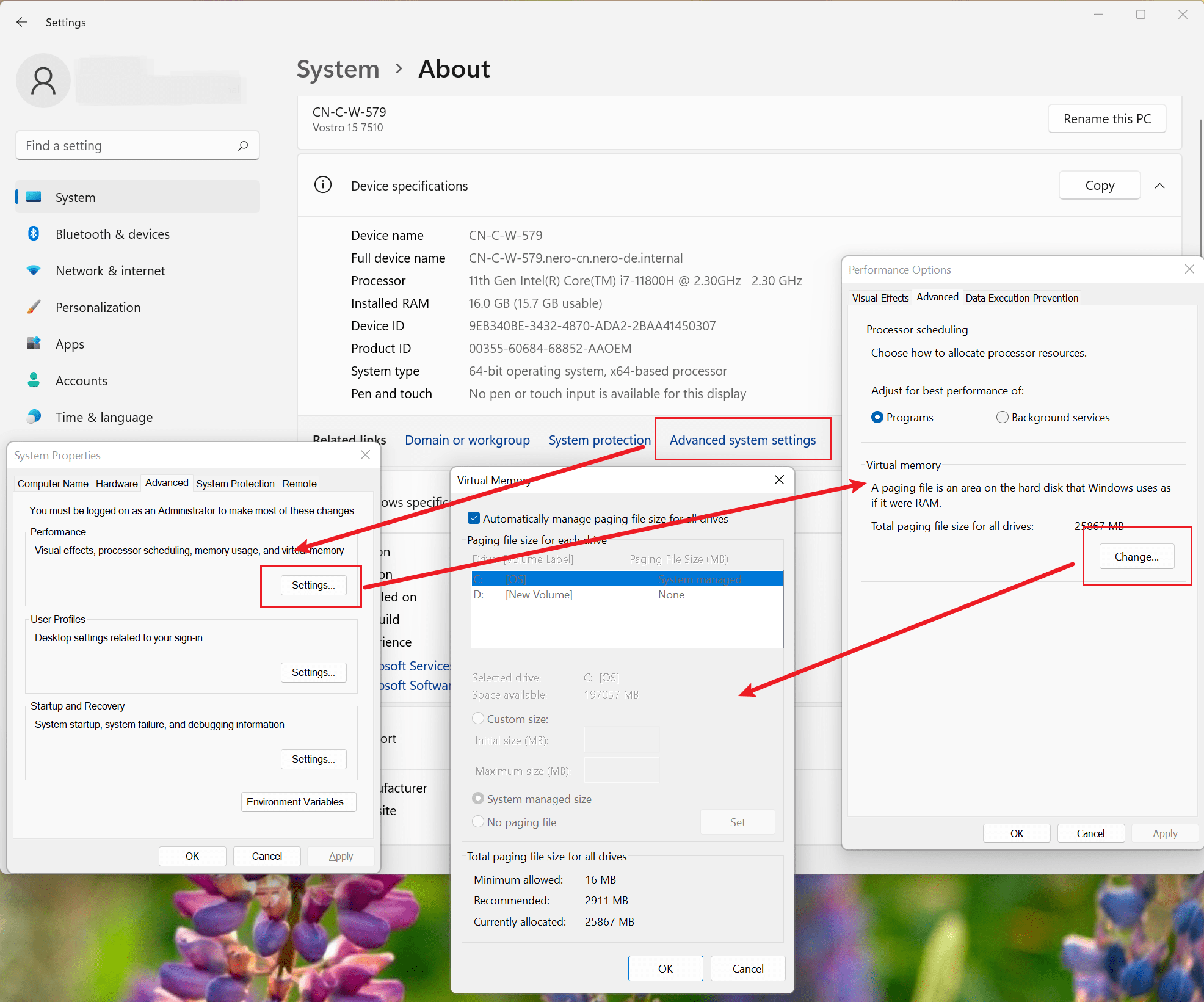
Um dieses Problem zu umgehen, konfigurieren Sie die Größe der Auslagerungsdatei manuell. Führen Sie dazu die folgenden Schritte aus:
Drücken Sie die Windows-Logo-Taste + die Pause-/Break-Taste, um die Systemeigenschaften zu öffnen.
Wählen Sie Erweiterte Systemeinstellungen und dann im Abschnitt Leistung auf der Registerkarte Erweitert die Option Einstellungen.
Wählen Sie die Registerkarte Erweitert und dann im Abschnitt Virtueller Speicher die Option Ändern.
Deaktivieren Sie das Kontrollkästchen Größe der Auslagerungsdatei für alle Laufwerke automatisch verwalten.
Wählen Sie Benutzerdefinierte Größe, und legen Sie dann die Werte für „Anfangsgröße“ und „Maximale Größe“ für die Auslagerungsdatei fest. Es wird empfohlen, die anfängliche Größe auf das 1,5-fache des Arbeitsspeichers im System festzulegen.
Wählen Sie OK, um die Einstellungen zu übernehmen, und starten Sie dann das System neu. Wenn Sie weiterhin Fehlermeldungen erhalten, dass der Speicher voll ist, erhöhen Sie die „Anfangsgröße“ der Auslagerungsdatei.