Turn low-resolution footage into sharper, more detailed video with the next generation of AI-powered upscaling.
Video enhancement is evolving. With Nero AI Video Upscaler 2027, we’re introducing a new AI upscaling model, powerful editing tools, and a redesigned interface that gives you more control over every step of your workflow.
Whether you’re restoring old footage, preparing videos for larger screens, or creating content for social media, the latest version makes it easier to transform your videos and get more from every frame.
Here’s a closer look at what’s new.
🚀 Meet AuroraSR: A New Generation of AI Upscaling
The biggest upgrade in Nero AI Video Upscaler 2027 is AuroraSR, our brand-new video upscaling model.
Built with an advanced Transformer architecture, AuroraSR analyzes the content of each frame to better understand textures, structures, and visual details. It can intelligently reconstruct fine textures and micro-details that may not be clearly visible in the original footage.
The result? More refined details and a sharper, more natural-looking image when your video is enlarged.
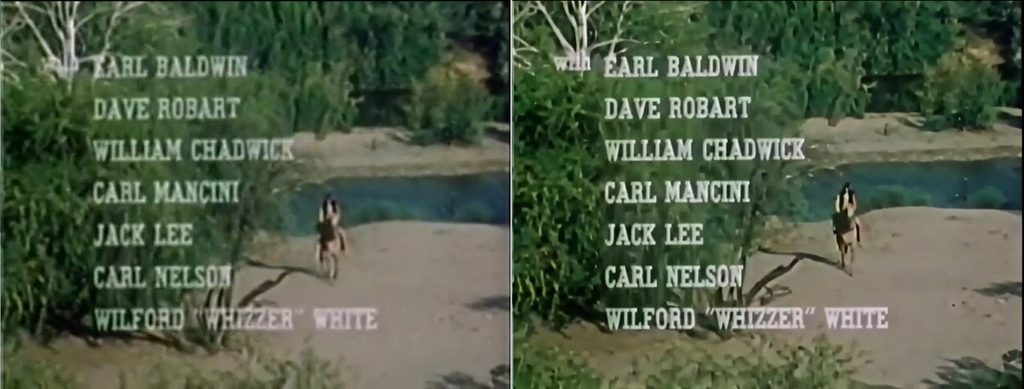
Whether you’re enhancing older footage, improving low-resolution clips, or preparing videos for high-resolution displays, AuroraSR is designed to bring out more detail while making the most of your target resolution.
System requirement: AuroraSR requires an NVIDIA RTX GPU with at least 8 GB of VRAM.
More detail. More clarity. A new level of AI video enhancement.
✂️ New Crop Tool: Reframe Your Video with Ease
Not every video comes with the perfect composition.
Black borders, unwanted edges, or a format that doesn’t match your target platform can all affect the final result. The new Crop tool gives you a simple way to reframe your footage before upscaling.
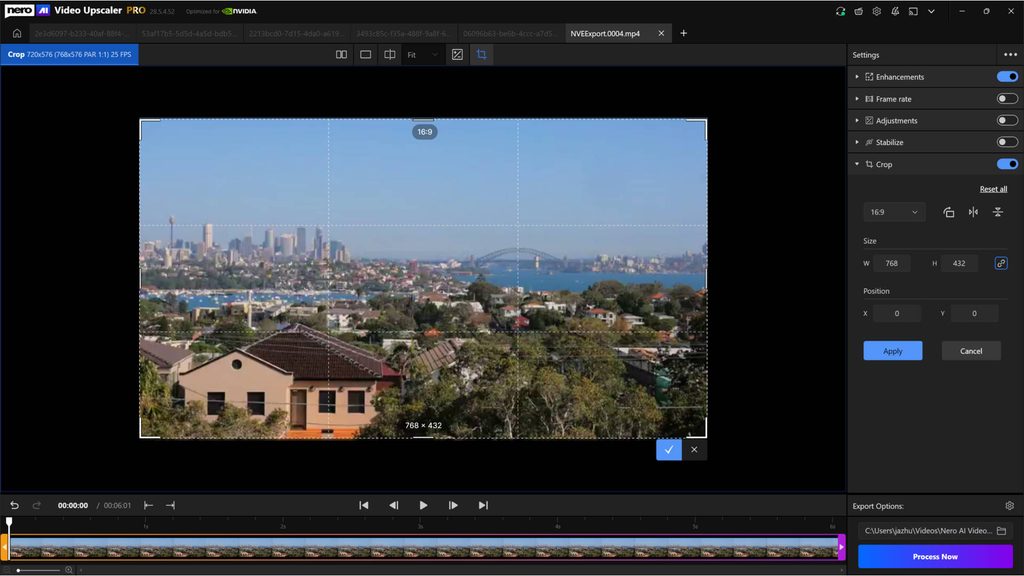
Choose the area you want to keep and adjust your video to the aspect ratio you need.
From Horizontal to Vertical in Just a Few Steps
Want to turn a landscape video into content for social media?
With the Crop tool, you can select the most important part of a horizontal video, create a vertical composition, and then upscale it to a higher resolution.
It’s an easy way to repurpose existing footage for modern vertical-first platforms.
🔄 Rotate and Flip: Fix Your Video Orientation
Sometimes the footage itself is fine—the orientation just isn’t.
Rotate Your Video
Videos recorded on smartphones can occasionally end up facing the wrong direction, especially when the phone is held at an unusual angle.
The new Rotate tool lets you quickly correct the orientation and get your footage facing the right way.
Flip Mirrored Footage
Some videos may also appear mirrored after recording, editing, or transferring between devices.
With the new Flip tool, you can quickly reverse your footage to restore its correct orientation. The Flip controls are conveniently placed next to the Rotate tools, so you can make adjustments without interrupting your workflow.
🎨 A Redesigned Interface for a Smoother Workflow
Nero AI Video Upscaler 2027 isn’t just more powerful under the hood. We’ve also redesigned the user experience to make your workflow more flexible and intuitive.
Work on Multiple Videos at the Same Time
With multiple editing tabs, you can import and edit several upscaling projects simultaneously.
Switch between different videos without closing your current project, making it easier to manage multiple enhancement tasks in one place.
More Organized Controls, More Creative Freedom
We’ve rearranged the control panels to make available features easier to find and use.
Each function is clearly organized, and you can turn individual features on or off independently, giving you greater control over the final result.
Whether you want to make a few subtle adjustments or apply a complete enhancement workflow, the new interface makes it easier to customize your process.
⏸️ Pause and Resume Exporting
Large video projects can take time to process, and you don’t always want to wait for an export to finish.
Nero AI Video Upscaler 2027 now lets you pause an exporting job and resume it later.
Even if you relaunch the application, your export can be resumed, giving you more flexibility when working with large files or multiple projects.
🌟 Upgrade Your Video. Expand Your Possibilities.
Nero AI Video Upscaler 2027 brings together a new generation of AI upscaling and a more flexible video editing workflow.
With AuroraSR, you can unlock finer details and improved clarity. With the new Crop, Rotate, and Flip tools, you have more freedom to reshape and correct your footage. And with the redesigned interface and flexible export workflow, managing your projects becomes easier than ever.
Smarter AI. Greater control. Better video.
Discover Nero AI Video Upscaler 2027 and take your videos further.